
Payment & Security
Your payment information is processed securely. We do not store credit card details nor have access to your credit card information.
Description
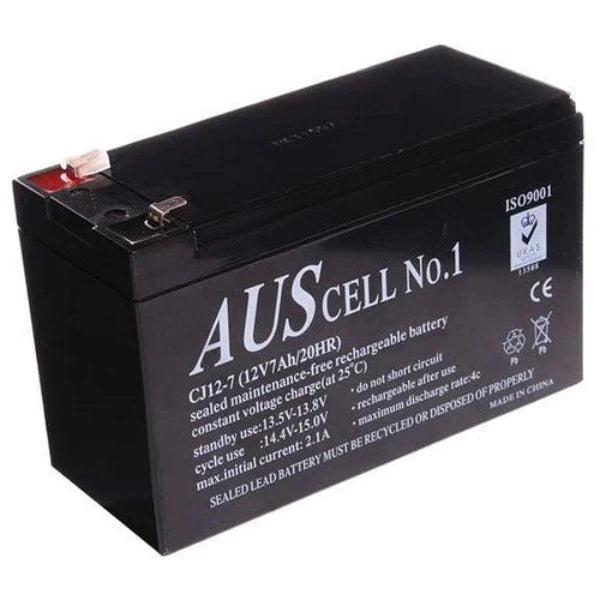
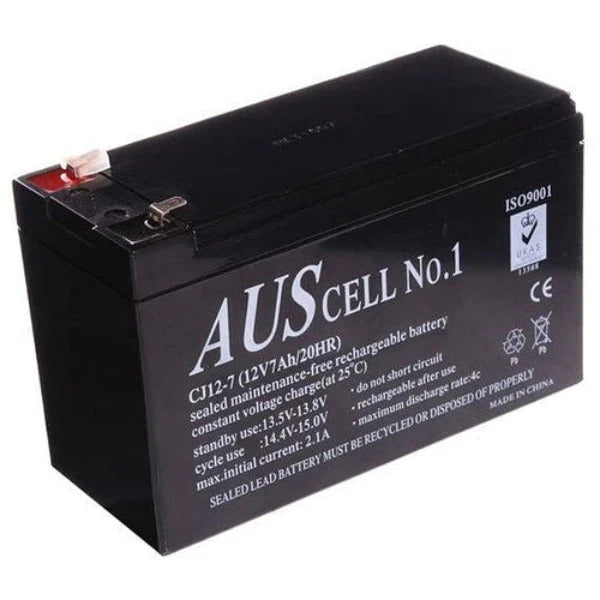
Backup Battery for Bosch Solution Panels 12V 7.0AH
Suitable with Bosch, Hills, Reliance , DSC and all commonly used Alarm System 12v 7ah Alarm battery, will work with most alarms and UPS Devices. Image used is just for illustration.
Specifications :
- 12Volt 7Ah Rechargeable Lead Acid Battery
- Sealed maintenance free rechargeable battery.
- Push on terminals.
- Approx dimensions 150mm long x 64mm wide x 100mm tall (including terminals)
- Genuine Rechargeable Battery
- Suitable with Bosch, Hills, Reliance , DSC and all commonly used Alarm System
- Same day dispatch available
- Alarm batteries are not covered for warranty purposes for panel or power failure.
6 Easy Steps to change a security alarm battery
Step 1
Turn off the electrical supply to your system.
Step 2
If your alarm system is monitored, contact the control room to let them know you are going to change the backup battery. This will prevent the control room sending a patrol company to your premises.
Step 3
Locate the alarm system battery in the control panel. Typically the alarm system battery will be installed in a walk-in robe, cupboard or even a spare bedroom wardrobe.
Step 4
Open the control panel box. You can usually do this with a control panel key (sometimes left on top of the control box), or you may need to unscrew the cover. When you open the cover, your alarm may go off. Make sure you have your code on hand to turn off your system if this occurs.
Step 5
Disconnect the battery. Remove both the black and red wires from the battery terminals. You should be able to do so gently by hand, or you may prefer to use pliers. (To avoid receiving a shock, make sure you do not touch the battery terminals or open-end of the wire connectors with any metal implement.)
Once disconnected, remove the old battery and dispose of it responsibly.
Step 6
Connect the new battery, making sure you are using a battery of the same size and voltage as the original. Start by removing any plastic protectors from the new battery, then connect the wires.
Ensure the battery is not put in backwards—the printed information should be facing towards you. Insert the RED wire in the RED battery terminal, and the BLACK wire in the BLACK. Ensure the connectors are tightly connected to the battery terminals. If you have a multimeter, use it to check that the battery is charging. Close the control panel and lock.
Shipping & Delivery Policy
CTC Security
31/1 Prime Drive, Seven Hills, NSW 2147
Australia-Wide Delivery
Shipping Rates
-
Standard Shipping: Flat rate of $18.49 on all orders
-
Express Shipping: Flat rate of $40.00
-
Free Shipping: Automatically applied to all orders over $750
All product prices displayed on our website exclude shipping fees.
Despatch & Handling Time
-
Orders are processed and dispatched Monday to Friday, 8:00 AM – 4:00 PM
-
Please allow 2–4 business days for order processing before dispatch
-
Once dispatched, standard shipping times are typically 3–7 business days depending on your location within Australia
Delivery Information
-
We do not deliver to P.O. Boxes
-
We use trusted courier services including Australia Post and Couriers Please
-
Transit times may vary based on your delivery address and regional courier delays
Order Confirmation & Tracking
-
After placing your order, you will receive an Order Confirmation Email
-
Once your order has shipped, a Tracking Number will be sent to your email
-
If your item is back-ordered or unavailable, we will notify you and void the pre-authorisation on your payment method
-
Orders with items in stock will be charged and shipped within the estimated despatch window
Need Assistance?
If you have any questions about your order, please don’t hesitate to contact our customer service team. Prompt responses to our emails or calls help avoid delays.
1300 552 282 or info@ctccommunications.com.au