


Payment & Security
Your payment information is processed securely. We do not store credit card details nor have access to your credit card information.
Description
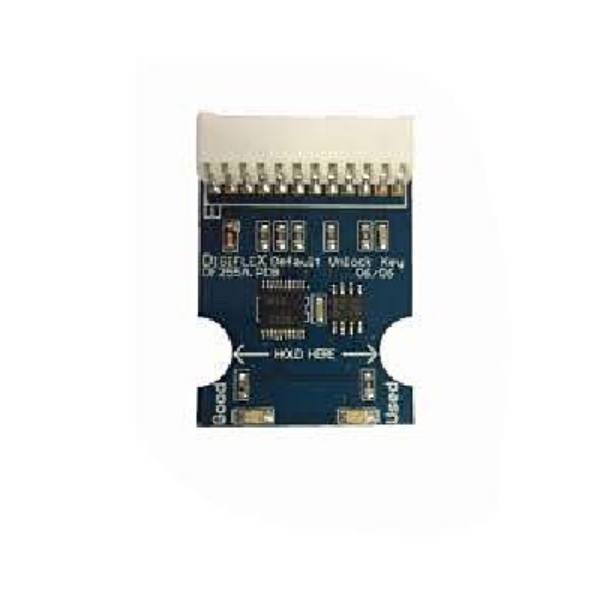
The Bosch Solution unlock key CM255B will unlock any existing master code or Installers code, this chip will not default the existing panel programming settings.
Model : CM255B
Shop CTC Security for best deals on Bosch 6000 Security Alarm Systems
Features
- The Bosch Panel Default Unlock Key will reset Installer PIN and RAS PIN on Solution series
- Key will reset the installer code to default installer code (1234)
- No change to the programming.
- Works on 16 Plus, 64, 16i, 144, 6000
- Allows panel default from installer lock out.
- one use only.
- Unlocks installers code add saves programming
- Works on 16 Plus, 64, 16i, 144, 6000
- Compatible with all Digiflex Panels
✅ Steps to Use the CM255B Unlock Key (Single Use Only)
-
Power Off the Panel
Disconnect both AC power and the battery from the alarm control panel. -
Locate the Serial Port
Open the panel enclosure and locate the “Serial Port” (also known as the Direct Link Port). -
Connect the CM255B
Plug the CM255B module into the serial port. Ensure it is correctly aligned (refer to panel diagram if unsure). -
Power On the Panel
Reconnect AC power first, then battery. -
Observe the LED Indicator
-
Green LED only: Key is valid and ready to use.
-
Red LED only: Key has already been used — discard.
-
Alternating Red & Green flash: Factory default in progress.
-
-
Remove the Key
Once LEDs are flashing alternately, the reset is complete. Remove and discard the CM255B — it cannot be reused. -
Default Installer Code & MyAlarm Setup
After using the key, the installer code will reset to1234.
This will allow you to access the menu and perform setup tasks, including:-
Go to Menu 509
-
Enter the 11-digit Installer ID
-
Register the panel to the MyAlarm platform for remote access and management.
-
Not compatible with 880, 862 or older series, Solution 2000, Solution 3000
- Solution 16i (Complete Factory Desault)
- Solution 16+ (Complete Factory Desault)
- Solution 64 (Complete Factory Desault)
Downloads
Bosch 6000 Residential Brochure
Bosch 6000 Commercial Brochure
Installation Guides
Bosch Quick Installation Guide
Bosch Installation Cheat Sheet
Shop CTC Security for Best Deals on Bosch Solution Modules.
Shipping & Delivery Policy
CTC Security
31/1 Prime Drive, Seven Hills, NSW 2147
Australia-Wide Delivery
Shipping Rates
-
Standard Shipping: Flat rate of $18.49 on all orders
-
Express Shipping: Flat rate of $40.00
-
Free Shipping: Automatically applied to all orders over $750
All product prices displayed on our website exclude shipping fees.
Despatch & Handling Time
-
Orders are processed and dispatched Monday to Friday, 8:00 AM – 4:00 PM
-
Please allow 2–4 business days for order processing before dispatch
-
Once dispatched, standard shipping times are typically 3–7 business days depending on your location within Australia
Delivery Information
-
We do not deliver to P.O. Boxes
-
We use trusted courier services including Australia Post and Couriers Please
-
Transit times may vary based on your delivery address and regional courier delays
Order Confirmation & Tracking
-
After placing your order, you will receive an Order Confirmation Email
-
Once your order has shipped, a Tracking Number will be sent to your email
-
If your item is back-ordered or unavailable, we will notify you and void the pre-authorisation on your payment method
-
Orders with items in stock will be charged and shipped within the estimated despatch window
Need Assistance?
If you have any questions about your order, please don’t hesitate to contact our customer service team. Prompt responses to our emails or calls help avoid delays.
1300 552 282 or info@ctccommunications.com.au